Case Study CP810: Interactive Learning: Multimedia CD
Abstract
Reference: CP810
Classroom practice: Multi-level class with a Year 12 focus
Title: Interactive Learning: Multimedia CD
Duration: One year
Overview: Students developed an interactive multimedia CD-ROM using industry best practice for a designated target audience, and learnt about programming principles, interactivity and interface design, animation coding and technological practice in ICT.
Focus points:
Background

Screenshot from Katie's 'Polar atoms' game (Click image to enlarge)
Hillcrest High School in Hamilton is a decile 8 co-ed secondary school with a roll of nearly 1,600 students. Its five-member ICT department headed by Jenny Baker is part of the school's Business and Information Technology Faculty.
Jenny came to teaching after graduating from Canterbury University School of Fine Arts in 1970. After teaching Art at Katikati College and Fairfield College for five years, she took a break to start a family. When she returned to the classroom, it was to teach Maths and Computing at Te Aroha College, Te Aroha. In 1990 Jenny joined the staff at Hillcrest High School where she has been responsible for the growth of the ICT Department and the school's computer network.
Jenny's capability and enthusiasm have been recognised at both regional and national levels. In 2002 she was a finalist in the National Excellence in Teaching Awards (EiTA), and in 2004 received a Royal Society of New Zealand Teacher Fellowship to research technological practice in commercial and tertiary ICT. Jenny has also been involved in NCEA external assessment in Technology, and tutors trainee teachers at the University of Waikato.

At Hillcrest, ICT is a Technology choice at Year 9, and then an option subject in the Years 10-13 Technology programmes. The school offers three parallel streams of ICT study from Years 10 to 13:
ICT Programming – which emphasises problem-solving and technological design using a variety of ICT software and programming languages. Students are assessed against Computing Unit Standards and ICT Achievement Standards at Years 11, 12 and 13 and in addition, the Waikato University Computer Science Scholarship exam at Year 13. This class is the subject of this case study.
ICT Applications – which emphasises technological design using a variety of ICT software, and is assessed against a combination of Computing Unit Standards and ICT Achievement Standards, at Years 11, 12, and 13.
ICT Unit Studies – which enables students to work at their own pace, and is assessed using only Computing Unit Standards at Years 11, 12 and 13.
From 2005 to 2007, Jenny and fellow Hillcrest Technology teacher Karllie Clifton were part of a Beacon Practice cluster with two members of the Katikati College ICT department.
Pre-planning

When she began to plan her 2007 Year 12 ICT Programming course, Jenny wanted to further incorporate the insights she gained while involved in the Beacon Project, by ensuring the course included creativity, innovation, and fun, around a core of skill development, good technological practice and formally recognised achievement.
The course also needed to challenge and extend the growing skills, understandings and maturity of her students and dovetail into the department's carefully planned programme of learning progression. In the previous year, the Year 11 class had researched, designed and developed an educational computer game to meet the specific learning needs of an identified young person – see case study BP629 ICT – Programming.
In planning the year, Jenny had to bear in mind that she would be delivering it in mixed classes of Year 11, 12, and 13 students. Timetabling issues and her reluctance to lose good students, meant Jenny had committed herself to accommodating students in her classrooms wherever space allowed it. "Because I had taught these students before, or I had seen their work in the junior school, I didn't want to lose them due to a timetabling problem. So I accepted them whenever the timetabler could fit then in. This provided a new challenge!"
The Year 11 students were guided through the year, limited to one programming language but free to choose other software they wished to use.
In her Year 12 course, students were asked to develop an interactive multimedia CD-ROM to inform their peers about a real-life issue of their choice. They were free to combine a range of software (graphics, animation, action script, video, audio, programming code, etc), to create a professional solution.
In her Year 13 class, students worked independently with a client. They were required to identify and learn to use the software appropriate to the needs of their client issue, and, as in a real-life working situation, completely manage their own project development.
"So between Year 11 and Year 13, I go from helping them each step of the way through to throwing them in the deep end at Year 13 to prepare them for the real world."
Delivery
Student:
"My topic was based on Advanced PE. That's a subject I find incredibly enjoyable and it's something that I'm passionate about anyway, so being able to tie in ICT, which I love, with Advanced PE drove me a bit further. How passionate should students be about their issue? To a point where they could sit down a couple of hours a day and write code for it – that passion would push them through to a higher level of achievement."
At the beginning of the year, Jenny asked her Year 12 students to choose an issue they were passionate about – something they were studying in which they were really interested – resulting in a wide range of fascinating projects. Many students chose to work for one of their teachers, creating a solution to illustrate a particularly difficult aspect of the curriculum in an imaginative and interactive way, including 'Functional Anatomy' for the school's Advanced Physical Education Department, 'Polar Molecules' for the Chemistry Department. Others chose an external need and/or client, such as 'Learning the Road Code', and a 'Learning to Fly' CD-ROM for the Waikato Aero Club.
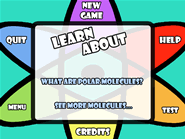
A screen-shot from Katie's Polar Molecules CD
"One student made his project about the war in Iraq. Another did his on risks in the outdoors. Another student created a program to help her father inform bee keepers about the varroa mite – although she wasn't working specifically for her peers, she was still creating a program where the bee keepers would probably have a similar expectation to the standard expected of a 16 year-old student."
During the first term, Jenny's students experimented with different multimedia programs, including animation, video capture and editing, sound recording and editing. After this, the students chose the software and programming language they wanted to use for their project.
Technological practice and project development was structured around 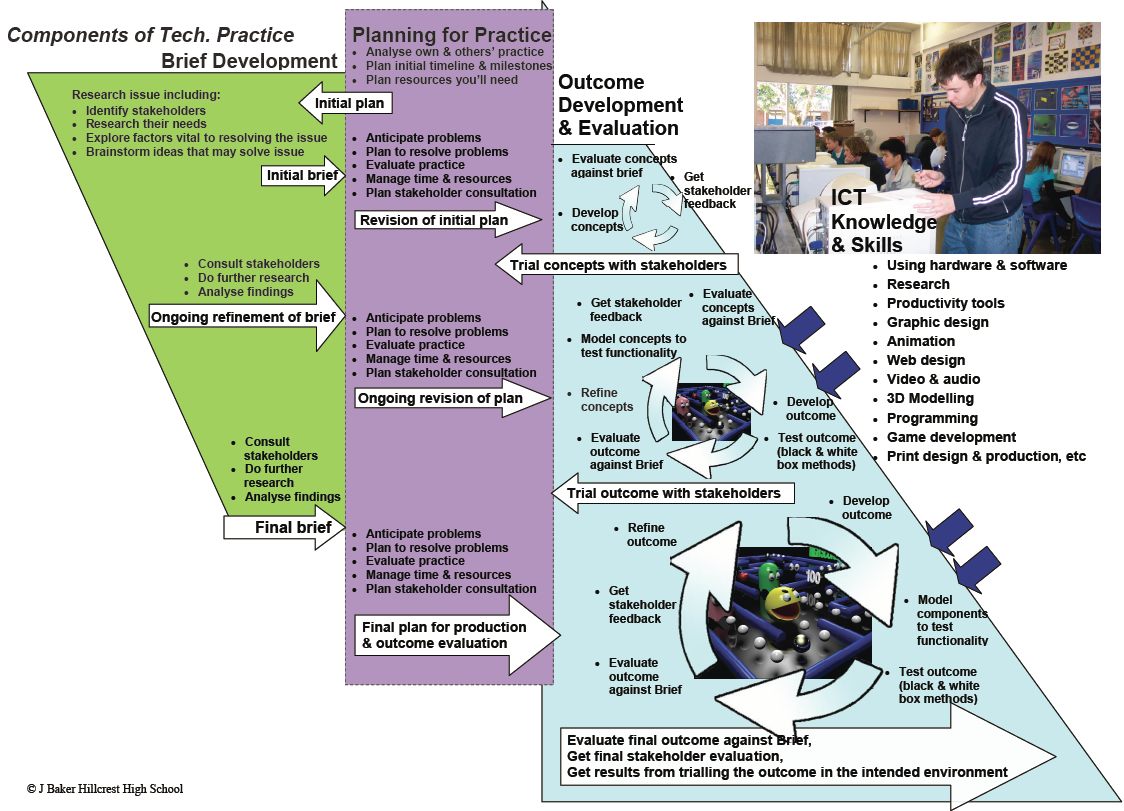
'The Diagram'>, a resource that Jenny had developed in 2005, and has progressively developed since. This diagram has proved an extremely useful resource, and is being used by other teachers at Hillcrest and other schools in the region.
Jenny's focus was very much on her students producing quality outcomes rather than ticking off assessment criteria. In 2006 she had used Level 2 external standards for the first time, which gave her a feel for what was required by the assessors. A number of her students met the standard for an Excellent that year, and this gave her the platform to extend her students further in 2007.
Resources covering programming and interface design were placed on the school's intranet, along with video case studies of expert ICT practice. "In Year 12 the external standard requires students to study ICT expert practice and use this to inform their own practice. I initially showed them relevant videos of expert practice, and they learn to search for expert knowledge to help them solve problems and extend the professionalism of their solution."
In delivery of the Year 12 course, Jenny worked with students individually, encouraging them to use their technological practice in an intuitive way. Part of the aim was to affect a low-key switch of emphasis from performing for assessment to meeting the needs and expectations of a client. "I try to get my students to think about what it is they are making, who they are making it for, what they need to do to make it better for that person, and who they can go to for expert knowledge. The evidence for assessment just falls out naturally during their practice through the year."
Outcomes
Jenny says that the standard of the final outcomes was even higher than the previous year. All projects were well received by their intended audiences, and two-thirds of the students met the standards for an Excellent in the external assessment.
Jenny credits much of this success to her use of the Alternative Assessment Schedules that cluster members had developed with Professional Support Facilitator Hugh Derham. The shift to the alternative schedules saw more intuitive, 'natural' technological practice, improved student/teacher interaction, and more insightful and subtle assessment of student work, she says. See BP629 ICT Programming, BP628 Junior ICT Programme,BP630 Multimedia CD-Roms."My aim was to make students' technological practice more intuitive. I wanted them to think 'OK I've got a problem, how am I going to solve it? What's the best tool for the task?', so that they did whatever was natural for them for that particular problem."
The Alternative Assessment Schedules give Jenny's students a clear understanding of what the standards required of them, by making the terminology easier to understand and including clear explanations of the additional requirements for meeting the standards for Merit and Excellent.
They also enable Jenny to unobtrusively collect evidence of achievement during her one-on-one chats with students. During these student meetings, Jenny often had students use a whiteboard to talk through their progress, problems, plans and queries. "I find this a good way of getting evidence from students – you can see the way they're thinking by the way they're explaining and drawing, and I can feed-back and 'feed-forward' and help them in a more effective way.
"But of course, for some students, expressing their ideas in words is perfect, for others it's not. It's important for students to provide evidence in a way that is natural for them, rather than is easy for the assessor."
Delivering the course in a mixed-level classroom was a challenge. Initially Jenny had to work to keep all of the students' practice aligned so they were roughly at the same stage of development. "I found all the mixed levels hard at the beginning of the year, but once I got the hang of it, I had everyone doing the same part of the process simultaneously. Experiments that worked with one group, I would carry on with in another group."
A good example of this is the 'chair' exercise, that Jenny worked through at different levels in her mixed classes. The exercise was designed as part of a research project by Vicki Compton to examine student understanding of the new strands of the Technology curriculum. When the classes were studying the principles of interface design by designing graphical user interfaces (GUIs) to meet their client's needs, Jenny gathered a selection of chairs from around the school and had students analyse them in terms of their form, function, materials, production and intended users.
" I had Year 11,12 and 13 students arguing about why a chair was a certain shape, what a particular piece of chair was for, why it was designed that way, and why a certain material had been used. The dynamics in the class were amazing."
Another important factor behind the quality of the final outcomes was the emphasis Jenny placed on students making good use of help from outside experts.
"As problems arose, I encouraged students to research how experts had solved similar problems. I saw that the expert input was helping their solutions become more professional and polished."
One student commented that seeking outside advice had enabled him to think in terms of other people's technological practice and, as a result, to improve his own. "It gets you thinking in terms of past values, and successes, and the reasons why different people have managed to do something similar and how they managed to get it to work. And the difference between their project and your own. You'll build an idea before you've even had your own experience of what you need to be doing."
The students responded well to the authenticity of real-life practitioners grappling with real-life problems. Authenticity appears to be important to the successful use of outside experts. One student commented that although they were branching out and "getting into the more open-world kind of thing" in the classroom, a classroom was still a classroom and the 'classroom mentality' remained.
While a narrow age-gap between student and expert may help, perhaps a more important factor to the success or failure of the interaction is how closely aligned the expert is with the student problem. "An expert should be someone who I want to end up being," says one student. "Because when you're motivated by someone like that, you really want to adopt their practice – you automatically get excited about it."
What next?
The course is work-in-progress and can always be improved upon, Jenny says. "I never do things the same way twice. I'm always thinking: 'What went right? What went wrong? How can I improve?' That's how you get progression in the quality of the course, and the quality of the outcomes of the students."
A survey at the end of the 2007 year revealed that students would have preferred to decide on what they were going to do earlier in the year, so they could learn the techniques required. "Rather than experimenting with a whole lot of techniques and then saying, 'I like this and I'll use it for that', they would rather have made the decision on what they were going to be doing, then worked out what they needed to learn, and then learn it," says Jenny.
Teaching things on a need-to-know basis can speed things up to a certain extent, Jenny says, particularly in a mixed classroom, where a range of projects are being undertaken. "It serves a number of purposes: it gets students up and rolling and into their project development earlier, rather than doing a lot of theoretical design work up-front; and it smoothes out the time-management wrinkles in the normal development process by enabling students to identify the more demanding sections of their projects and allocate their time accordingly."
It is also a way for Jenny to introduce the Modelling and Systems curriculum threads into her teaching. Jenny recognised the potential advantages of the approach after she had her Year 11 class experiment with reverse engineering. She asked her students to take an existing computer game, play it, then disassemble it. After diagramming the result, the class recognised that the game was a system made up of a series of sub-systems and inter-connected parts.
"When they developed their own program, the students first modelled their own 'game plan' diagram, then divided it into a series of components and worked on each component one at a time taking it to their clients, and getting it tested. 'Working perfectly? Done!' Then it was on to the next component. And so it meant that instead of students doing a lot of initial written work, they were starting their development earlier on."
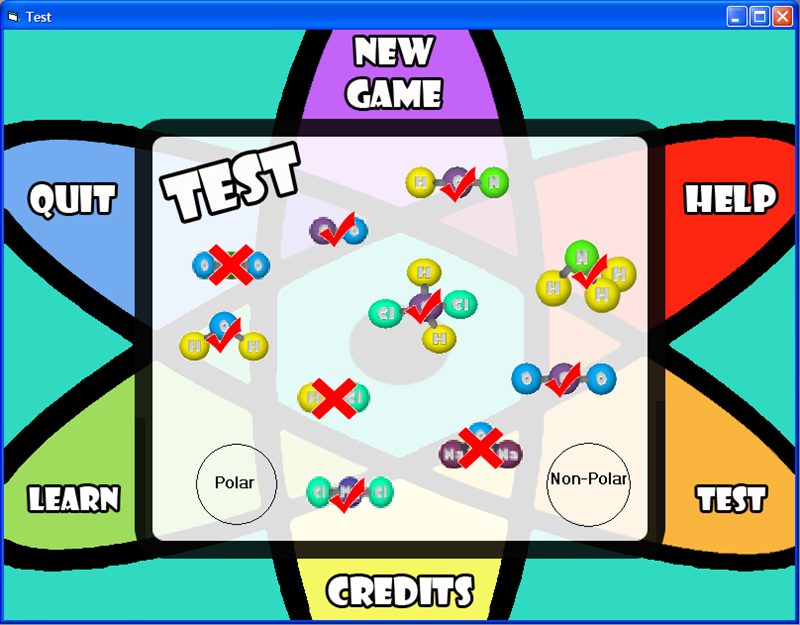
Screenshot from Katie's 'Polar atoms' game (Click image to enlarge)
In 2008, Jenny had her students use a modelling approach based on expert practice used at Jade Software in Christchurch. Jenny explained to the class how developers at Jade working on a large project for British, Welsh, Scottish Railways had met with the project's major stakeholders, brainstormed ideas with them, and then modelled these initial results. These models were gradually refined and a programme of development agreed upon. The whole project was broken up into a collection of subsections – each subsection was developed, tested, refined using client feedback and tested again, before the developers moved onto the next subsection.
"The students saw the tech practice the experts had used in an enormous British project and then used the same approach in their modelling dividing their projects into a series of subsystems, which were worked on one at a time. They planned in teams – something they had also requested in the 2007 end-of-year survey."
The teams brainstormed all the things they needed to do for their project, wrote them on post-it-notes and stuck these to a large sheet of paper. They put these notes into sequence and then divided the entire collection into subsections.
The process had to be managed to ensure team members didn't coat-tail on the work of others, Jenny says. "Because they were working in teams, I was worried that some people would do all the work and others would get credits for doing nothing." To avoid this, she had each student create their own colour-coded schematic of the proposed project (using Inspiration software).
The students are currently (August 2008) in the process of working through their diagrams, using client/teacher client feedback for each step.
This approach is slightly at odds with the conventional one, which involves completing a conceptual design for an entire project before moving onto development work; but, Jenny says, the expert approach used by the Jade developers makes sense and it works.
"If something follows external expert practice, isn't that what we [teachers] are meant to be doing?"
The modelling approach, she says, also satisfies the requirement, outlined in the external Level 2 standards, for students to look at outside technological practice, identify appropriate approaches and use them in their own practice, and justify their choices. The approach neatly embraces the new Technological Knowledge thread of the curriculum in that it deals with products and systems.
In the 2007 unit Jenny had asked her students to develop an interactive multimedia CD-ROM to inform their peers about a real-life issue of their choice. Many, but not all, students chose to work for one of their teachers, creating a solution to illustrate a particularly difficult aspect of the curriculum in an imaginative and interactive way.
In 2008, Jenny required all her Year 12 students to use teachers as clients. She suggested they find a teacher that they got on well with and who would be prepared to give them feedback. Together they were to chose a topic within a subject that the student enjoyed and that the teacher felt was difficult to get across with the resources available. The aim of their project work is to develop a graphical interactive tool to help their client teach that particular aspect of the curriculum.
Jenny is now implementing the Alternative Assessment Schedules at all three levels. "Some IT teachers feel that there's either the Computing Unit Standards, or there's Technology Achievement Standards. We integrate both, whatever is appropriate at the time for the students you're working with."
"In surveying my students, I found that they didn't want masses of credits – they were only able to use a certain number. They would rather put all their effort into getting the top grades."
Another benefit of using the Assessment Schedules is that it can reduce the amount of paperwork students have to do: "I'm trying to make the gathering of the evidence less onerous so the students have time to concentrate on what they are making. They are still thinking and doing everything that the curriculum demands – it's just that they aren't writing everything down."